


Cooking Fever: Restaurant Game
4.4233.31K Reviews
App Specs
- Version
- 27.1.3
- Updated On
- License
- Free
- Downloads
- 100,000,000+
- Developer
- Nordcurrent Games
- Categories
- Arcade
- Platform
- Android, iOS
Screenshots

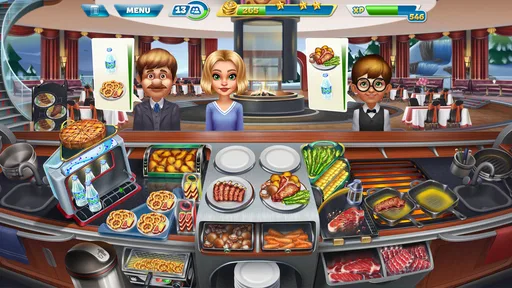
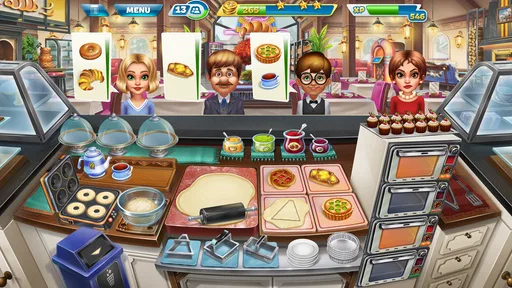
 Analysis by AppCompare
I tend to enjoy arcade games that give me something to do with my hands and attention without asking me to learn a complicated control scheme. Cooking Fever: Restaurant Game fits that mood: it turns restaurant service into a sequence of quick decisions, where I prepare orders, keep an eye on several customers, and try not to let a busy kitchen get ahead of me. It is easy to understand, but the pace can become demanding once more tasks compete for attention.
That distinction matters when choosing a cooking game. This is not a quiet recipe book or a realistic restaurant simulator; it is an arcade time-management game from Nordcurrent Games, built around serving customers under pressure. I see its strongest appeal in short sessions that feel lively, with enough progression to give repeated play a purpose. Someone looking for a slow, creative cooking experience may prefer a different kind of game.
How quickly the kitchen gets moving
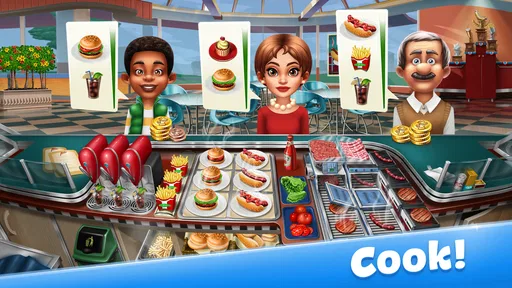
The opening tutorial introduces the basic routine without making the early game feel like a manual. I learn by handling orders and seeing how preparation, serving, and equipment upgrades fit together. That makes the first sessions approachable even if I have not played this style of game before. The colorful presentation also makes the action easy to follow: dishes, customers, and kitchen stations are visually distinct rather than buried in a realistic-looking interface.
Guides and Analysis on Cooking Fever: Restaurant Game
Once several orders arrive close together, the challenge is less about knowing what to do and more about choosing what to do next. I have to notice which item needs attention, avoid letting one task distract me from another, and serve food before customers lose patience. The game’s speed therefore comes from the demands of the level, not from a complicated control system. It suits players who enjoy a brisk rhythm, though anyone wanting a relaxed game to play while barely paying attention may find the later pressure unwelcome.
Busy sessions reward a little planning
A useful habit is to scan the full set of orders before tapping through the kitchen. When I focus only on the nearest customer, it is easy to overlook an item that takes longer to prepare; a quick glance helps me start that task early and use waiting moments productively. I also try to treat each level as a small routine: identify the bottleneck, keep an eye on anything that can be left cooking, then return to serving. That approach feels more reliable than frantic tapping.
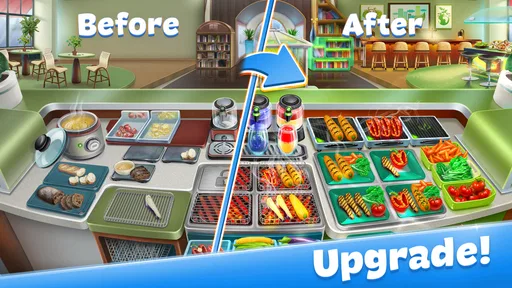
Upgrades have a practical role beyond making a restaurant look different. Improving equipment can make the work feel more manageable, while décor and ingredients contribute to the broader sense of building a restaurant. I would avoid spending every resource as soon as it becomes available. If a particular stage feels difficult, it is more useful to consider which kitchen improvement could remove the pressure point than to upgrade randomly. That makes progress feel more deliberate, especially for players who do not want to buy their way through a frustrating moment.
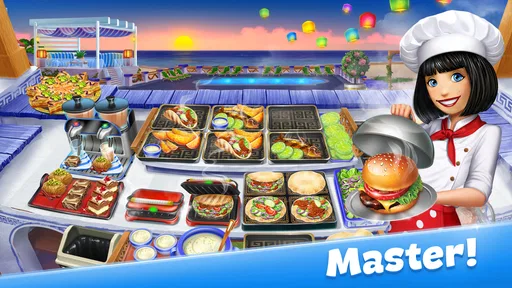
The game includes many themed restaurants and a large run of levels, so the basic service loop gets varied settings rather than remaining visually identical throughout. The challenge rises as I advance, and that is where the arcade design is most effective: familiar actions become harder to coordinate. I would expect a player who enjoys chasing a cleaner, quicker run to get more from this structure than someone who only wants to see new dishes without repeating the core routine.
Worth Reading Before You Choose

Ludo King Makes the Most of the Minutes Between Plans

Baby Panda World Brings Quick Play to Modern Phones, but Its Game Library Feels Busy

ESPN’s Live Game View Makes Following Close Games Easier

QuizzLand Review: A Good Fit for Short Trivia Breaks, Not Every Player

Basketball Stars: Multiplayer Is Fast, but Can It Recover When Matches Go Wrong?

WEBTOON Turns Phone Updates Into a Better Reading Routine
Reliability, device demands, and playing in short bursts
In my experience, the simple visual language is a good fit for a game that asks for quick attention. Clear food and customer animations help me read what is happening, and the interface does not need to imitate a real kitchen to make the pressure understandable. The game is rated for Everyone, so its cheerful presentation is approachable for a broad audience, while the quick decisions still give older players a reason to improve.
For everyday use, I would treat it as a game best played when I can focus for a few minutes rather than something to leave running while multitasking. A commute break, a quiet moment before dinner, or a short wait are natural occasions for a level or two. The important trade-off is attention: if I keep looking away, I can lose track of an order and turn a manageable round into a scramble. It is a better fit for brief, focused play than for background entertainment.
Because it is an active arcade game, a crowded level can feel more demanding than its bright artwork suggests. I would keep the display comfortable and avoid starting a difficult run when I am already tired or distracted. If the game ever feels sluggish on a particular device, closing other demanding apps and restarting the game are sensible first steps, but performance can vary by device and connection conditions. I would not mistake a momentary slowdown for a problem with the cooking strategy itself.
The game is free to start, with in-app purchases ranging from $0.99 to $130.00 per item. I can make progress through play, while purchases may speed things up, so I recommend deciding in advance whether I am comfortable spending rather than treating a difficult level as a reason to buy. Ads are presented as optional rewards in the original experience described here, which can be a reasonable exchange when I want a boost, though players who dislike any ad-based prompts may find them unwelcome.
Who will enjoy the pace—and who may not
I would recommend Cooking Fever to people who like quick arcade challenges, enjoy improving a routine through practice, or want a colorful game that can be picked up for a short session. It also works for players who like seeing a small restaurant develop as they earn resources and make choices about improvements. Its long progression gives that audience a reason to return, but the central appeal remains the hands-on rhythm of cooking and serving.
I would point players seeking open-ended restaurant design, realistic cooking, or a calm, story-led experience elsewhere. This game asks for timely actions and repeats a recognizable service pattern, even as the setting and difficulty change. It also may not suit someone who wants all progress to happen without waiting or who is especially sensitive to optional purchase prompts. Knowing that before starting makes it easier to judge the game on its own terms.
Compared with the usual alternatives in the cooking category, this one leans more toward rapid order handling than experimentation with recipes or simulation. That is a strength when I want clear goals and immediate feedback; it is a limitation when I want to invent dishes or manage a restaurant in a more spacious way. The best way to decide is to ask whether a timed sequence of customer orders sounds satisfying. If it does, the game’s focused loop is a better reason to try it than the broad cooking theme alone.
Getting Started in the Kitchen
First things first, Cooking Fever: Restaurant Game is available on both Android and iOS, so no matter which device you prefer, you're good to go. Once you download it, you're greeted with a vibrant, cartoonish world that's surprisingly immersive. The graphics are colorful, the animations are smooth, and everything looks deliciously inviting.
The game kicks off with a quick tutorial that guides you through the basics of managing your restaurant. You'll learn how to prepare dishes, serve customers, and upgrade your kitchen equipment. It's user-friendly and doesn’t overwhelm you with too much info at once. Honestly, it’s as if the game knows when you’re ready to take on more challenges.
Mastering the Art of Cooking
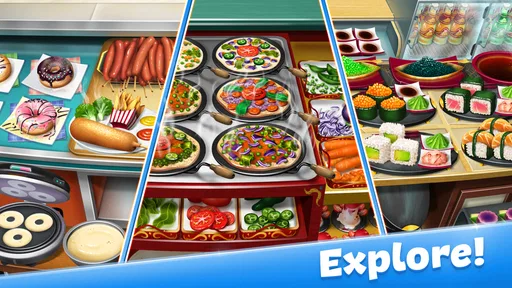
One of the coolest things about this app is the variety of cuisines you get to explore. Whether it's sizzling burgers, spicy Indian dishes, or Italian pasta, there's always something new cooking up. The game features over 1,000 levels across different themed restaurants, so you’re never short of challenges.
Each level presents its own set of tasks, and as you progress, the difficulty ramps up. You need to be quick on your feet, juggling between multiple orders while ensuring everything is cooked to perfection. It’s a test of speed and precision, and it keeps you on your toes. Plus, the satisfaction of serving a perfectly cooked dish to a happy customer is seriously rewarding.
Upgrades and Customizations
What I love about Cooking Fever is the ability to upgrade your kitchen and restaurant. As you earn coins and gems, you can invest in better appliances, décor, and ingredients. This doesn’t just make your place look snazzy; it also improves your efficiency. Faster ovens mean quicker cooking times, which means happier customers. And let's be real, who doesn't love a little customization?
The game also offers daily challenges and achievements, which are a great way to keep things fresh. Completing these tasks rewards you with extra coins and gems, giving you more opportunities to upgrade and expand your culinary empire.
In-App Purchases and Ads
Now, like many free-to-play games, Cooking Fever does include in-app purchases and ads. While you can earn coins and gems through gameplay, purchasing them can speed up your progress significantly. I found the game quite enjoyable without spending real money, but if you're impatient like me, you might be tempted to buy a few upgrades here and there.
As for the ads, they’re not overly intrusive. You can choose to watch them voluntarily in exchange for rewards, which is a nice touch. It’s a fair trade-off, especially if you’re looking to boost your in-game currency without opening your wallet.
Final Thoughts
Overall, Cooking Fever: Restaurant Game is a delightful mix of strategy, time management, and creativity. It’s easy to pick up and play, yet challenging enough to keep you hooked for hours. Whether you're a casual gamer or someone looking for a bit more depth, this game delivers.
If you're ready to don your virtual chef's hat and dive into the world of culinary challenges, give Cooking Fever a try. Just be warned, it might make you a little hungry!
Pros
- Engaging gameplay with diverse cuisines.
- Frequent updates with new content.
- User-friendly interface for easy navigation.
- Offline play available for convenience.
- Vibrant graphics enhance visual appeal.
Cons
- In-app purchases can be costly.
- Progression can feel slow without spending.
- Limited customization for restaurant themes.
- Repetitive tasks may become monotonous.
- Ads can interrupt gameplay frequently.
FAQs for Cooking Fever: Restaurant Game
What is Cooking Fever: Restaurant Game about?
Cooking Fever: Restaurant Game is a time-management game where players run various restaurants, preparing and serving dishes to satisfy customer orders. With over a thousand levels, it offers a variety of cuisines and settings. Players can upgrade their kitchen equipment and interior to enhance efficiency and customer satisfaction.
Is Cooking Fever free to play?
Yes, Cooking Fever is free to download and play. However, it offers in-app purchases for items like gems and coins, which can be used to speed up progress or enhance gameplay. While these purchases can enrich the experience, they're not strictly necessary to enjoy the game.
What platforms is Cooking Fever available on?
Cooking Fever is available for both Android and iOS devices. You can download it from the Google Play Store or the Apple App Store. The game is optimized for mobile devices, offering a seamless and engaging experience on both smartphones and tablets.
Does Cooking Fever require an internet connection?
Cooking Fever can be played offline, which is great for gaming on the go without relying on a stable internet connection. However, some features, like syncing progress across devices or accessing certain updates, may require internet access.
How can I progress faster in Cooking Fever?
To progress faster in Cooking Fever, focus on upgrading your kitchen equipment and interior as soon as possible. Prioritize upgrades that enhance speed or increase customer patience. Additionally, replaying earlier levels can earn extra coins and gems, helping you advance more quickly.


